Almost every Workspace customer we work with at Cobry has asked us some version of the same question in the last twelve months: "We already pay for Gemini in our Workspace plan. Why would we buy Gemini Enterprise on top?"
It is a fair question and Google's own marketing hasn't made it easy to answer. The two products share the Gemini name, run on the same underlying model family, and overlap in a lot of features. There are also some key differences - they do fundamentally different things, sit on different parts of the Google Cloud commercial structure, and solve problems for different parts of the organisation.
This guide walks through where they overlap, where they do not, what each one costs, and how to decide whether you need one, the other, or both. We deploy both for clients, so we will flag the bits the vendor pages tend to avoid.
The short version
If you only read this far:
- Gemini in Workspace is the AI assistance baked into Gmail, Docs, Sheets, Slides, Meet and Drive. It comes bundled in your Workspace plan and helps individuals work faster inside the apps they already use. You also get the chat experience at gemini.google.com.
- Gemini Enterprise is a standalone Google Cloud platform for AI agents that work across your business systems (Salesforce, ServiceNow, SharePoint, SAP, custom databases). It costs $21 to $60 per user per month on top of Workspace.
- They serve different jobs. Gemini in Workspace makes individual users more productive. Gemini Enterprise orchestrates work across an organisation.
- Most companies that need both will deploy them together, with Gemini Enterprise targeted at a subset of the headcount rather than everyone.
- The overlap is real (Deep Research, NotebookLM, grounded chat) but smaller than the marketing suggests.
- If you only need productivity AI inside your Google apps, Workspace is enough. If you need agents that act across systems, Workspace alone will not get you there.
If you need the detail, keep reading, and if you want a feature-by-feature comparison, go to our homepage.
What each product actually is
Before comparing, a clean definition of each.
Gemini in Workspace
Gemini in Workspace is the AI assistance built directly into the Google productivity apps you already use. It sits inside Gmail, Docs, Sheets, Slides, Meet, Drive, Vids, Forms and Chat. It writes, summarises, generates formulas, drafts replies, takes meeting notes, creates images for slides, and lets users chat with the Gemini model from a side panel that has access to their own work context (their emails, their documents, their calendar).
Since January 2025, Gemini features are bundled into all paid Workspace plans rather than sold as a separate add-on. Business Standard ($14/user/month annual), Business Plus ($21.60/user/month annual), and the Enterprise tiers (custom-priced, typically $20 to $35 per user per month) all include the core Gemini features. The bundling came with a 17 to 22 percent price increase across plans, which absorbed the cost of what used to be a $30/user/month add-on.
Higher-tier plans get more of everything: more AI credits for video and image generation, higher limits on Workspace Studio (the no-code AI flow builder), more advanced features in Gemini, larger context windows when working with documents.
The mental model: Gemini in Workspace is the AI that lives inside your apps, as well as your chat interface in Gemini webapp.
Gemini Enterprise
Gemini Enterprise is a separate Google Cloud product built on the technology previously known as Agentspace. It is not a Workspace plan, not a tier, and not bundled into anything. You buy it directly from Google Cloud or through a partner.
The product is a platform for AI agents that work across your business systems. Users get a unified chat interface that grounds answers in company data from Drive, SharePoint, Salesforce, ServiceNow, Jira, Confluence, SAP, Workday and custom sources. They get a gallery of pre-built Google agents (Deep Research, NotebookLM, sales prospecting, contract review, IT support). On the Standard and Plus editions, they can build their own agents using Agent Designer, govern them centrally, and deploy them to other users.
Pricing runs from $21 per user per month for Business edition (up to 300 seats, lighter governance), $30 for Standard (annual commit), $50 for Plus (annual commit, full agent platform), with a Frontline edition for deskless workforces sold as a custom-priced add-on.
The mental model: Gemini Enterprise is the AI that lives outside your apps and acts across them.
What they have in common
Worth being honest about the overlap before getting into the differences.
The chat experience
At the surface, it may seem that both GE and GWS have the same front-end chat experience, and if you were to look at them at face value, you'd be correct.
Both products run on Google's Gemini model family. Both respect enterprise data protection rules. Your prompts and outputs are not used to train models in either product under the standard enterprise terms. Both integrate with Google identity and admin controls. Both support Workspace data sources (Drive, Gmail, Calendar) natively.
A few specific features overlap and this is where buyers get confused:
Deep Research is available in both. Workspace Enterprise Plus customers get Deep Research through the bundled Gemini features. Gemini Enterprise customers get Deep Research as one of the pre-built agents on the platform. Same feature, two delivery surfaces. The Gemini Enterprise version can pull from a wider set of business sources (anything you have connected as a data source on the platform); the Workspace version is more bounded to Workspace data and the public web.
NotebookLM is similarly available in both, though the Gemini Enterprise version (sold as NotebookLM Enterprise) has stronger admin controls, broader connector access, and better governance. Most large organisations using NotebookLM seriously will end up wanting the Enterprise version regardless of how they buy it.
Grounded chat with company data is available in both. Gemini in Workspace lets users chat with their own Workspace context (their docs, their emails, their meetings). Gemini Enterprise lets users chat with the organisation's full data fabric (everything connected as a source, regardless of where it lives).
Image and video generation is available in both. Gemini in Workspace gives users image generation in Slides and Vids and video generation through Veo; Gemini Enterprise gives users the same generative capabilities through the unified chat interface, with higher quotas on Plus.
Workspace Studio (the no-code AI flow builder) is the closest Workspace gets to Gemini Enterprise's agent builder. It is genuinely useful for simple flows that stay within Workspace data. It does not replace Agent Designer for production agents that need to integrate with external systems, govern access at the agent level, or run continuously without user invocation.
There is meaningful overlap at the "user chats with AI grounded in company data" layer. There is much less overlap at the agent and orchestration layer.
The differences
Where the products part ways.
Reach across your data
Gemini in Workspace is excellent at the data inside Workspace and limited beyond it. If your knowledge lives in Drive, Gmail and Meet recordings, Workspace Gemini handles it natively. The moment your knowledge lives in Salesforce, ServiceNow, SharePoint, Jira, SAP, Workday or a custom database, Gemini in GWS isn't able to reason with that very well.
Gemini Enterprise is built for the opposite case. The connector library is the product. Standard and Plus editions ship with first-party connectors for all the major enterprise SaaS systems and the ability to build custom connectors via the API, and Agent Engine. There's also bonus governance and security - a user asking a question only sees results from sources they have access to in the underlying systems.
Agentic capability
Gemini in Workspace gives you AI assistance and Workspace Studio for simple flows. Workspace Studio is good for things like "every Monday, pull last week's customer feedback emails from this label, summarise them, and post the result to a Chat space". It runs inside Workspace, on Workspace data, with light governance.
Gemini Enterprise gives you Agent Designer (no-code), the developer tooling for custom agent code, the agent gallery (pre-built and third-party), and the governance surface to run those agents at production scale. An agent on Gemini Enterprise can watch a shared inbox, classify incoming requests by reading them and looking up customer history in Salesforce, draft a response based on similar past tickets in ServiceNow, post an internal Slack notification to the right team, and log every step for audit. It can do this continuously, without a user clicking "run" each time.
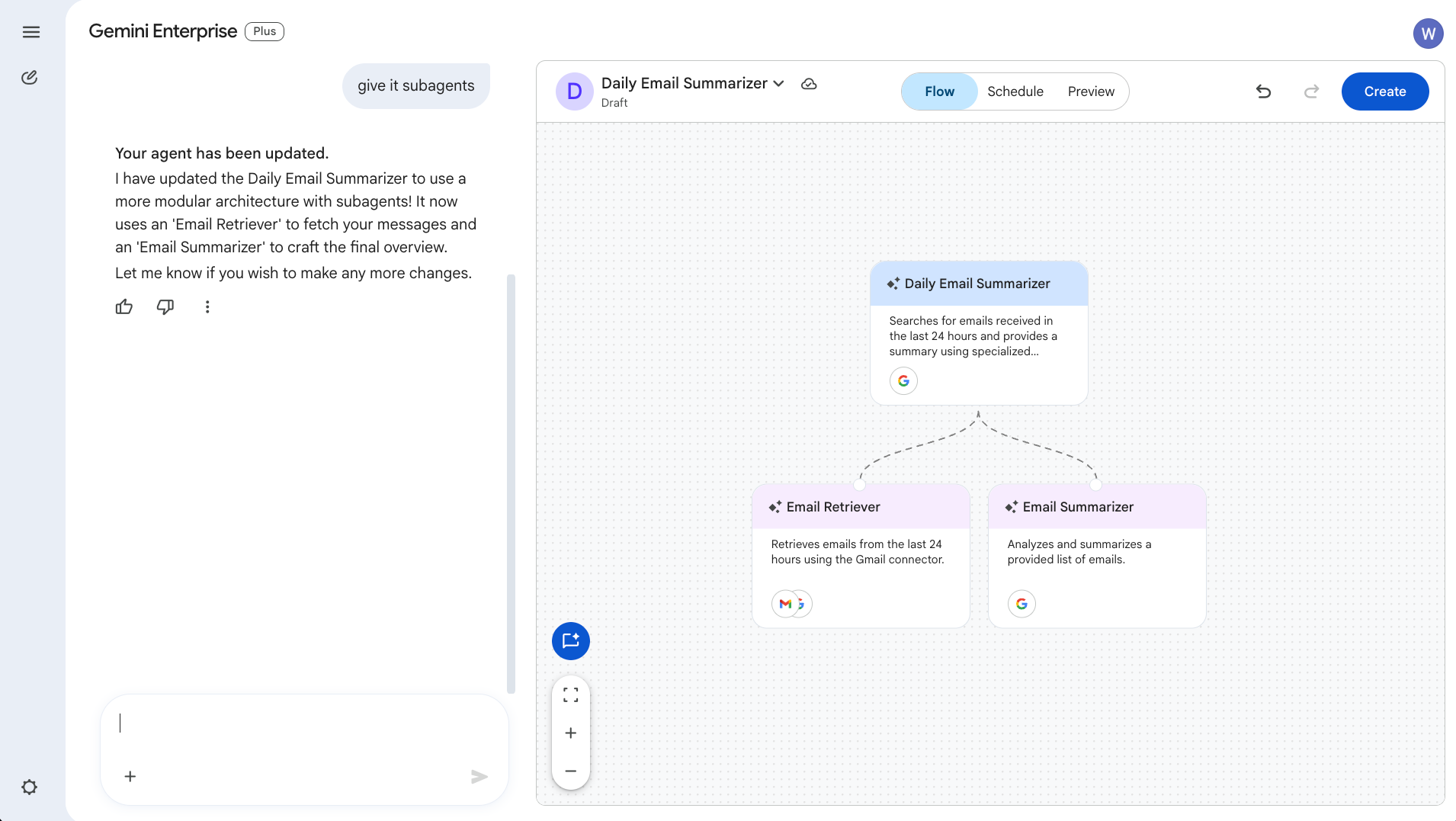
This is the capability gap, and it is the bit Workspace alone cannot bridge.
Governance posture
Both products have enterprise-grade security and admin controls, but they are calibrated for different scales of deployment.
Workspace's Gemini features inherit Workspace's existing admin model. You manage them through the Workspace admin console, you control AI usage at the OU and group level, and you log activity through Workspace audit logs. This is sufficient for most organisations using Gemini features as productivity AI inside familiar apps.
Gemini Enterprise has its own admin surface with deeper controls: per-agent access policies, data source-level scoping, audit trails for every agent action, VPC Service Controls, Customer-Managed Encryption Keys, Access Transparency, FedRAMP High and HIPAA support, and data residency controls. These are the controls you need when you are running production agents that touch regulated data, when you have a compliance team that audits AI usage at depth, or when you are deploying across multiple business units with different governance requirements.
If your security team audits every AI integration that touches customer data, the Gemini Enterprise governance model is what they will ask for. Workspace's controls, while good, were designed for productivity AI rather than autonomous agents.
Who it is for
Gemini in Workspace is for everyone in the organisation. The whole headcount benefits from AI assistance inside the apps they already use. There is no special user training needed beyond a short adoption push. Adoption curves we see typically hit 60 to 80 percent of active users within three months when the change management is decent.
Gemini Enterprise is for a subset of the organisation. Even in the most ambitious deployments, the active power users (the people building agents, running deep research workflows, integrating with enterprise systems) are usually 10 to 30 percent of headcount. The rest may consume agents that have been built for them, but they are not driving the platform.
This has procurement implications. Buying Gemini Enterprise Plus for everyone is almost always wasted spend. A tiered deployment makes more sense: Plus for the agent builders, Standard for the wider knowledge-worker base, Frontline for deskless staff if you have them.
The real cost picture
If you are already on Workspace Business Standard or Enterprise, you are already paying for Gemini in Workspace whether you use it or not. The cost of the bundled features is included. This makes the "do we use Workspace Gemini" question simple: yes, you should, you have already paid for it.
Gemini Enterprise is additional spend on top of Workspace. The seat fee runs $21 to $60 per user per month depending on edition and commit term.
How to decide which one you need
If you're already on a paid Google Workspace plan, you already have Gemini in Workspace. The first call to action is to actually use it. Don't buy GE until you've used the AI tools that you already have in Workspace. Switch them on. Run an adoption push. Measure usage for a few months. Then revisit the Gemini Enterprise question with real data on what your team is and is not doing with Workspace Gemini.
Where does your critical knowledge live?
If 80 percent of what your knowledge workers need lives in Drive, Gmail and Meet recordings, Workspace Gemini will get you most of the way. If a meaningful share lives in Salesforce, ServiceNow, SharePoint, SAP or other systems, Gemini Enterprise's connector reach is the differentiator. The honest test: ask three knowledge workers to log every time in a week they could not find or synthesise something they needed. If the answer is "almost never in Workspace data", you may not need the broader platform yet.
Do you have a real agent use case, not just a theoretical one?
Agents are the headline feature of Gemini Enterprise and they are also where most deployments fail to capture value. Successful agent rollouts have a specific multi-step workflow, a clear measure of success, and a person responsible for owning the agent's behaviour over time. If you cannot name the workflow, the metric, and the owner, you are not ready for the agent layer of Gemini Enterprise. Buy Workspace Gemini, get value from the productivity layer, and revisit when a real agent use case has surfaced.
Do you have a security or compliance requirement that needs the Gemini Enterprise governance posture?
If you are in a regulated industry (financial services, healthcare, public sector) and your security team needs VPC Service Controls, CMEK, or FedRAMP High specifically, Gemini Enterprise is the right answer regardless of agent use case. It's a nobrainer.
When you genuinely need both
The combined deployment is the right answer for a specific class of organisation, and it is worth being clear about which.
You probably need both if:
You have a meaningful population of knowledge workers (so they benefit from Workspace Gemini in their daily work) and a meaningful share of business-critical knowledge in systems outside Workspace (so they need Gemini Enterprise's connector reach). Most mid-market and enterprise organisations of more than a few hundred people fit this profile.
You have specific multi-step workflows that span systems and you want to automate them with agents. The agents that deliver the most value are typically the ones that touch three or four different business systems, and Workspace alone cannot orchestrate across non-Google systems.
You are running a multi-business-unit organisation where different teams have different governance requirements. The combination of Workspace's broad productivity layer and Gemini Enterprise's deeper governance gives you the flexibility to match the security posture to the use case.
You are deploying agents to a deskless workforce. Frontline edition only makes commercial sense as an add-on to an existing Standard or Plus deployment, and the knowledge-worker base typically benefits from Workspace Gemini regardless.
You probably do not need both if:
You are a smaller organisation (under 100 people) where everyone works primarily in Google apps and your data is overwhelmingly in Drive. Workspace Gemini will likely cover what you need without the additional complexity and spend of Gemini Enterprise.
You are deeply on Microsoft 365 already. Workspace Gemini does not apply to you, and the Microsoft 365 Copilot conversation is the more relevant comparison. Gemini Enterprise can still make sense for the agent platform and cross-system reach, but the productivity AI question gets answered by Copilot rather than Workspace.
You have not yet invested in cleaning up your data sources. The platforms are good but not magical. Connector quality starts at the source, and a deployment on a messy data foundation will fail regardless of how many seats you license.
Frequently asked questions
Is Gemini in Workspace included if I have Business Standard?
Yes. Since January 2025, Gemini features are bundled into all paid Workspace plans (Business Standard, Plus, and the Enterprise tiers). Higher tiers get more capacity (more AI credits, more advanced features, larger context windows), but the core Gemini features are available across all paid plans.
Can I get Gemini Enterprise without Workspace?
Yes. Gemini Enterprise is a standalone Google Cloud product. You can deploy it without any Workspace relationship, though most organisations using it also use Workspace. The integration between the two is genuinely tighter than between Gemini Enterprise and Microsoft 365.
Is Gemini Enterprise just Workspace Gemini for bigger companies?
No. They are different products with different scopes. Workspace Gemini is productivity AI inside your apps. Gemini Enterprise is an agent platform that operates across your business systems. Bigger companies often need both, but they are not the same thing at different scales.
Will Gemini Enterprise replace Workspace Gemini?
No. They serve different jobs and Google has positioned them as complementary rather than competitive. Most large customer deployments include both.
Does buying Gemini Enterprise upgrade my Workspace Gemini features?
No. They are separately licensed products. Buying Gemini Enterprise does not change what your Workspace users get inside Gmail, Docs and Sheets. Conversely, having Workspace Enterprise Plus does not give you the Gemini Enterprise platform for free.
Where does NotebookLM fit?
NotebookLM is a Google product that exists in three forms: a free consumer version (notebooklm.google), a version included in Workspace plans, and a version included in Gemini Enterprise (sometimes referred to as NotebookLM Enterprise). The Workspace and Enterprise versions have stronger admin controls and broader source connectivity. Most large organisations using NotebookLM seriously will use one of the paid versions.
Can I run Gemini Enterprise agents on my Workspace data?
Yes. Workspace data sources (Drive, Gmail, Calendar) are first-class connectors in Gemini Enterprise. An agent built in Gemini Enterprise can read and act on Workspace data with the appropriate permissions, alongside data from any other connected source.
Does my data train Google's models in either product?
No. Customer data on both Gemini in Workspace and Gemini Enterprise is contractually excluded from model training under the standard enterprise terms. This is different from the consumer Gemini app, where free-tier interactions can be used for training.
Which one is better for a 50-person team?
Almost certainly Gemini in Workspace alone. At that scale, the additional cost and complexity of Gemini Enterprise is rarely justified unless you have a specific cross-system agent use case. Get value from Workspace Gemini first, then revisit Gemini Enterprise when a real agent need surfaces.
Which one is better for a 5,000-person enterprise?
Probably both, deployed in a tiered shape. Workspace Gemini for the whole organisation (productivity AI for everyone). Gemini Enterprise Standard for the knowledge-worker base (cross-system grounded chat), Plus for the smaller group of agent builders, Frontline as an add-on if you have a deskless workforce.