What is Gemini Enterprise? A complete guide
Gemini Enterprise is the platform Google launched on October 9, 2025 to give businesses a single place to deploy AI agents across their internal data and tools. It is not a Workspace add-on. It is not a subscription tier of Google Workspace. It is a separate Google Cloud product with its own pricing, its own admin console, and its own purpose: building and running agents that act across your company's systems, not just chatbots that answer questions.
That distinction matters because Google has used the word "Gemini" to label a dozen different products over the past two years, and the naming has confused almost every buyer we work with. This guide walks through what Gemini Enterprise actually is, what each edition includes, what it costs, and where it sits in relation to the Gemini features baked into Google Workspace. We deploy this for clients at Cobry, so we'll flag the bits Google's marketing pages skip.
The short version
If you only read this far:
- Gemini Enterprise is a standalone Google Cloud platform, not part of Google Workspace.
- It was built on the technology previously called Agentspace.
- It comes in four editions: Business, Standard, Plus, and Frontline.
- Pricing starts at $21/user/month for Business and runs to $60/user/month for Plus on flexible billing.
- The point of it is agents that can act across your systems, plan multi-step work, and ground answers in your company's data.
- The Gemini features inside Gmail, Docs, Sheets and Meet are a different product. Those are bundled into Workspace plans now.
If you need more than that, keep reading.
How Gemini Enterprise differs from "Gemini in Workspace"
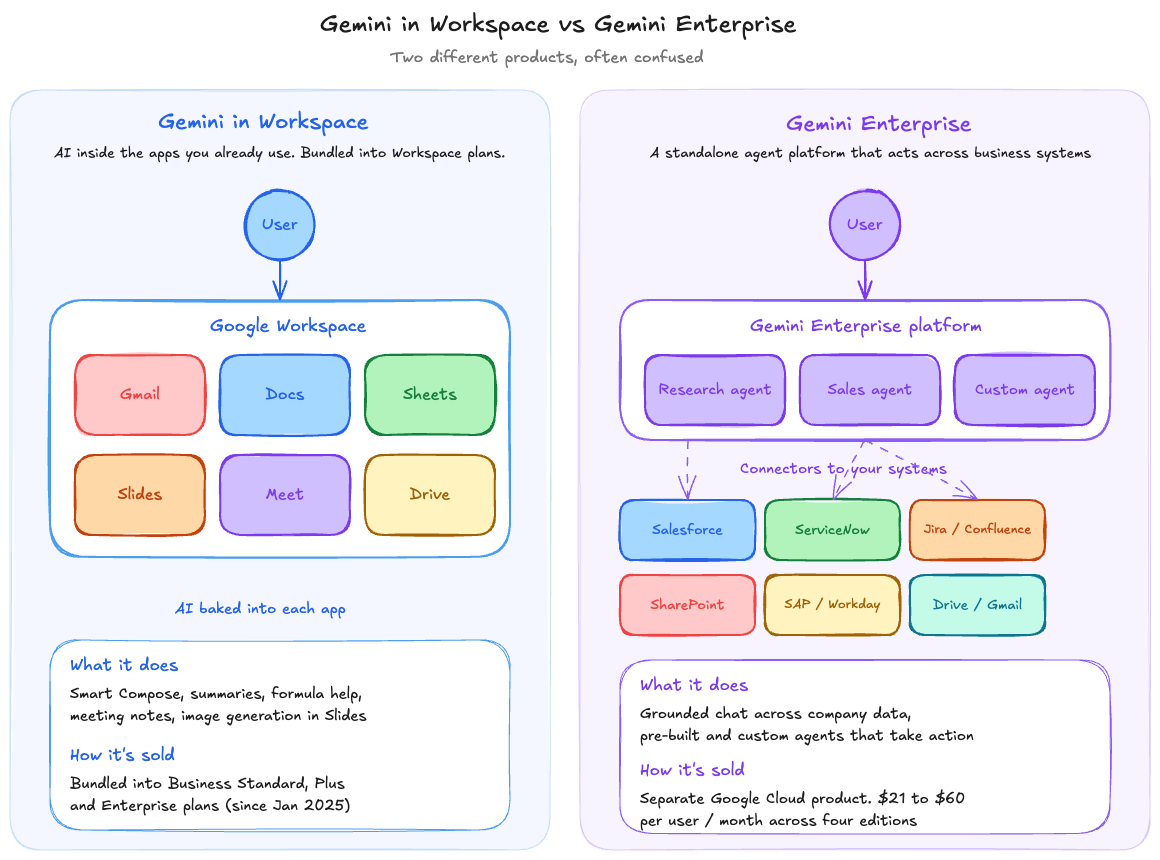
This is the single most common point of confusion, and it is worth getting straight before anything else. There are two distinct ways your organisation can buy Google AI today, and they do different things.
Gemini in Workspace is the AI assistance baked into Gmail, Docs, Sheets, Slides, Meet and Drive. Smart Compose, document summarisation, formula generation in Sheets, meeting notes in Meet. As of January 2025, Google discontinued the standalone "Gemini Business" and "Gemini Enterprise" Workspace add-ons that used to sell these features separately. The features are now included in all paid Workspace plans (Business Standard at $14/user/month annual, Business Plus at $22, Enterprise tiers negotiated). Google raised the per-seat prices by roughly 17 to 22 percent across Business and Enterprise tiers to absorb the cost of bundling.
Gemini Enterprise is the standalone agent platform we are discussing in this guide. It sits on Google Cloud, has its own admin surface, and gives users a unified interface to build and run agents that work across business data sources outside Workspace too: Salesforce, ServiceNow, SAP, Jira, custom databases, file shares.
You can buy one without the other. You can buy both. Most organisations we work with that already have Workspace are evaluating whether Gemini Enterprise adds enough on top of what's already bundled. The honest answer is: it depends on whether you want agents or just productivity AI. We'll come back to that.
What Gemini Enterprise actually does
Three capabilities sit at the centre of the product.
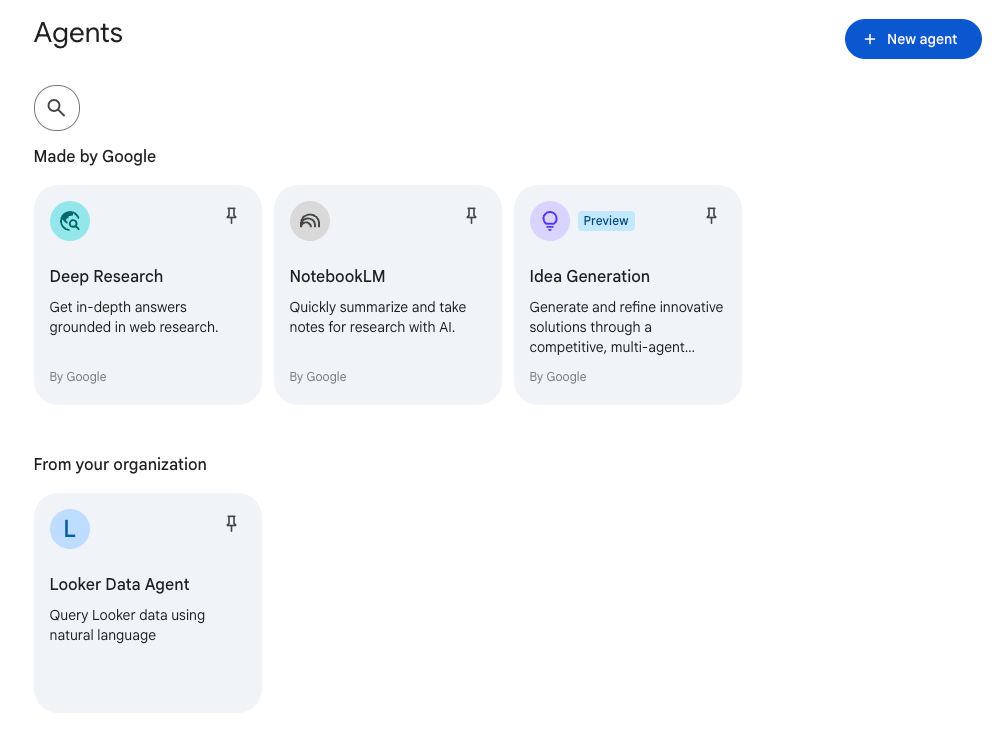
First, a unified chat interface that grounds answers in your company's data. Connect it to your Drive, your SharePoint, your Confluence, your Salesforce, and users get a single chat window where they can ask questions and get answers cited against internal sources. This is similar in principle to ChatGPT Enterprise's connectors or Microsoft 365 Copilot's grounding, but it indexes a broader set of business systems and uses Gemini 2.5 Pro and Gemini 3 Pro models depending on the task.
Second, a gallery of pre-built agents. Google ships agents for tasks like deep research, sales prospecting, contract review, IT support, onboarding workflows, and a handful of vertical use cases. Some of these are useful out of the box. Some are demos. The deep research agent is the strongest of the default set in our experience.
Third, the ability to build and govern your own agents using a no-code agent builder, with policy controls, access management, and observability for what agents are doing. This is the bit that makes Gemini Enterprise an enterprise platform rather than a chatbot. You can deploy an agent that, for example, watches a shared inbox, classifies incoming requests, looks up customer records in Salesforce, drafts a response, and posts a Slack notification to the right team. The same governance surface lets you control which data sources each agent can read, log every action, and roll back when something goes wrong.
The "agent" framing is doing a lot of the heavy lifting in Google's marketing right now. In practice, what you are buying is a place where users can chat with their company's data, plus tooling to wire up automations that act on it. Whether that constitutes "agents" depending on your definition is partly a vocabulary question. The capability is real either way.
The four editions, plainly explained
Gemini Enterprise comes in four flavours. Google's own comparison page goes feature-by-feature; here is what each one is genuinely for.
Business
The entry tier, priced at around $21 per user per month on an annual commitment. This is aimed at smaller deployments and teams that want the unified search and chat experience without the full enterprise governance surface. It includes the chat interface, a limited set of data connectors, and access to a curated set of pre-built agents. You cannot build custom agents at this tier, and the data indexing limits are tighter. Realistic use case: a 50 to 200 person company that wants Google AI to work across Drive, Gmail and a couple of external sources, without paying for the full platform.
Standard
The middle tier, $30/user/month on annual commit or $35/user/month on flexible billing. This is the "real" Gemini Enterprise tier for most knowledge-work organisations. It opens up more data connectors, adds basic agent governance, gives each user 30 GiB of storage for indexed data, and includes the media generation tools (image and video creation through Imagen and Veo).
Realistic use case: a mid-market company that wants company-wide search and AI assistance grounded in internal data, plus the ability to deploy a handful of agents for specific workflows.
Plus
The premium tier, $50/user/month annual or $60/user/month flexible. This is where the platform gets its full surface area: custom agent building, advanced governance, full connector library, deeper context window access, and the higher-intensity compute features. Google positions this for developers, power users, and teams building production AI workflows rather than just consuming them. Realistic use case: organisations that have an internal AI team or department leads who want to build and operate agents at scale, not just use them.
Frontline
A lighter, lower-cost edition aimed at large deskless workforces in retail, logistics, manufacturing, hospitality. Frontline users can use agents that have been provisioned for them by an administrator, but cannot build or modify agents themselves. The pricing is custom and negotiated based on volume; expect it to come in well below the Business tier on a per-seat basis for very large deployments.
Realistic use case: a retailer rolling out an HR support agent or a shift-management agent to ten thousand store staff who do not need the full chat interface.
What it costs in practice
The list prices above are the start, not the end of the conversation.
Per-seat fees are only one component. The Plus tier in particular is "license plus consumption". Heavy use of high-performance models pulls additional compute charges from your linked Google Cloud account. Google does not publish a clean unit cost for "an agent run" because the cost depends on which model the agent invokes, how big the context window is, and how many tool calls it makes. For modelling purposes, our rule of thumb is that an active power user on the Plus tier consumes roughly $15 to $40 per month of additional compute beyond the seat fee, but we have seen this go higher on heavy agent deployments.
Volume discounts. For deployments above 500 seats, Google's enterprise team will typically offer 10 to 20 percent off the list price, and more for multi-year commits. If you are also negotiating a Workspace renewal, bundling the two conversations gives you more leverage.
Frontline pricing is always negotiated. There is no list price. We have seen quotes range from a few dollars per seat per month for very large, very simple deployments up to twenty-plus dollars where the agents are doing more.
A practical note: Plus and Standard both require a 12-month minimum commitment to access the lower price. The flex billing rate is roughly 20 percent higher and is the right choice if you are running a pilot or do not yet know who in the organisation will use it.
The connector and data story
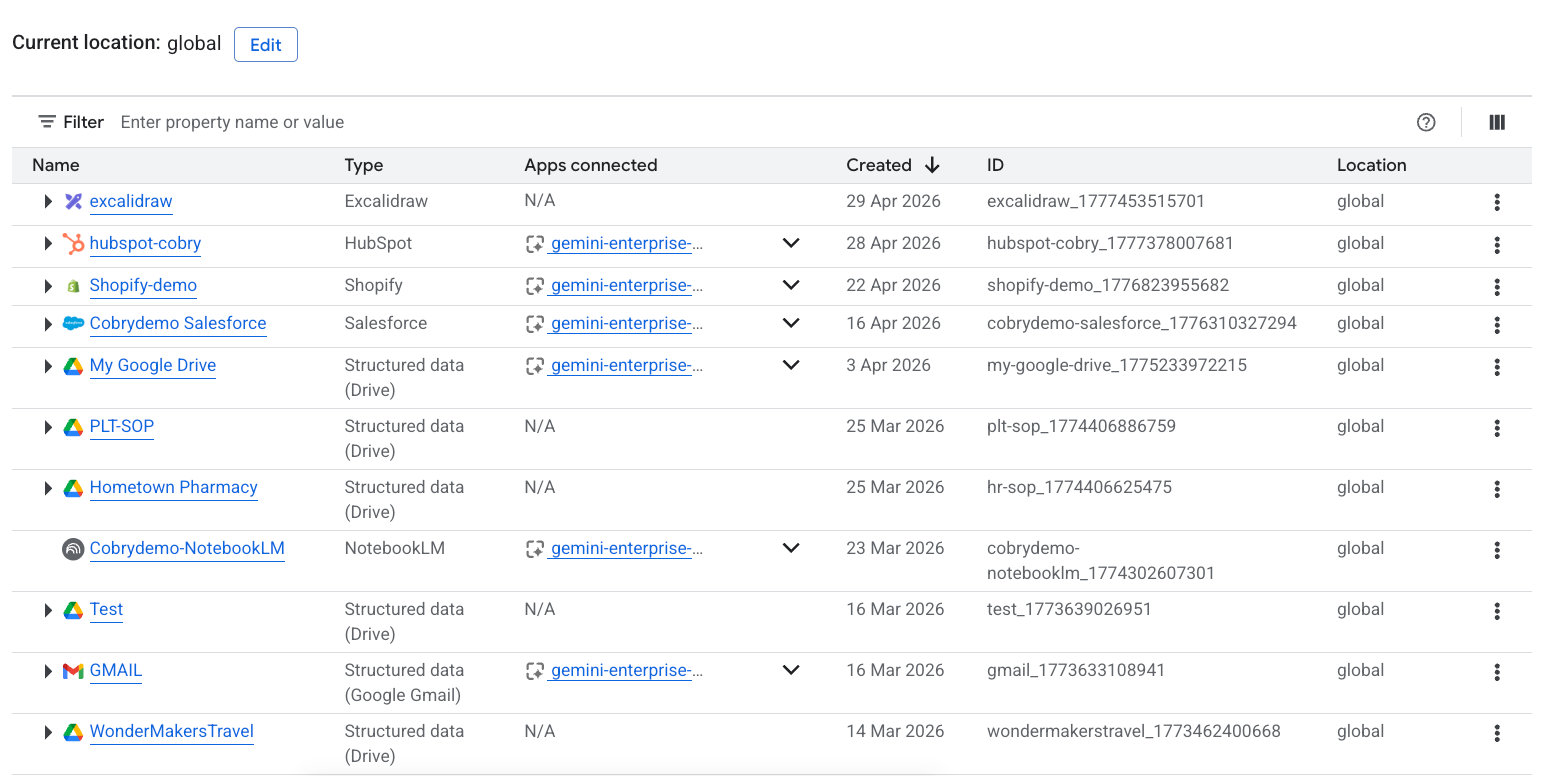
This is the bit that determines whether Gemini Enterprise is useful for your organisation, and it is also the bit that gets the least attention in Google's launch materials. Out of the box, Gemini Enterprise indexes Google Drive, Gmail (with the right scopes), and Calendar. That gives you a starting point for any company already on Workspace. From there, the connector library covers most of the systems large organisations actually run on:
- Microsoft 365 (SharePoint, Teams, Outlook, OneDrive)
- Salesforce
- ServiceNow
- Atlassian (Jira, Confluence)
- Box
- Slack
- SAP
- Workday
- Notion
- HubSpot
- Custom REST endpoints via the agent builder
The connectors at the Business tier are limited. You get the obvious Google ones plus a small number of third-party. At Standard you get a wider library. At Plus you get the full set plus the ability to build custom connectors using the API and BigQuery integrations.
A few things worth flagging from real deployments:
The indexing is good but not magical. If your Confluence is a wreck or your SharePoint is full of duplicate documents from 2018, Gemini Enterprise will faithfully reflect that mess back at users. Connector quality starts at the source; cleanup work is often the longest part of a real rollout.
Permission inheritance works. The connectors respect the permissions in the source system, so a user asking Gemini Enterprise about a document they do not have access to in SharePoint will not see it in the response. This is the bit Google does correctly that some of the early enterprise AI products got badly wrong.
Indexing has limits. Each user gets a quota of indexed content, and very large document sets (think: tens of thousands of contracts) need to be planned around the storage tier you are buying.
Where it fits next to Workspace, Vertex AI, and the broader Google AI stack
Google's AI portfolio has five distinct surfaces, and buyers regularly conflate them. Quick taxonomy:
- Gemini app (gemini.google.com) is the consumer-facing chat interface, like ChatGPT or Claude. Free tier exists. Paid tiers are AI Plus, AI Pro, AI Ultra. This is for individuals.
- Gemini in Workspace is the in-app AI inside Gmail, Docs, Sheets, Meet, etc. Bundled into Workspace plans. Productivity-focused.
- Gemini Enterprise is what this guide is about. Standalone Google Cloud platform for agents and grounded chat across business systems.
- Vertex AI is the developer platform for building with Gemini models (and others) directly via API. You pay per token, choose your model, deploy to your own infrastructure. This is for engineering teams building AI features into their own products.
- Gemini Code Assist is the developer-focused product for IDE-based coding assistance, comparable to GitHub Copilot. Sold separately.
The simplest mental model: Workspace is for the AI that lives inside your productivity apps; Gemini Enterprise is for the AI that lives outside them and acts across systems; Vertex AI is for engineers building custom AI products on Google's models; the Gemini app is for individual use; Code Assist is for developers writing code.
Should you buy it?
We work with companies that have made every possible decision on this question. A few patterns from the field.
You should probably buy Gemini Enterprise if:
- You have a meaningful amount of business-critical data living outside Workspace (Salesforce, ServiceNow, SAP, custom databases) and you want a single AI surface across all of it.
- You have specific multi-step workflows you want to automate and you have at least one technical person to build and govern agents.
- Your users are already asking for "ChatGPT for our company data" and you want to give them a sanctioned, governed alternative rather than have them paste sensitive content into consumer tools.
- You are running a Google Cloud-first stack and want the tightest integration with BigQuery, Vertex AI, and your existing Google identity model.
You should probably hold off if:
- You are already on Workspace Enterprise Plus and your users mainly want AI inside Gmail, Docs and Sheets. The bundled Gemini features cover the ground.
- You do not yet have a use case beyond "let users chat with our data". You can do that with cheaper tooling, and the value of Gemini Enterprise is in the agent layer.
- Your data sources are a mess. Cleanup costs more than the licensing if you skip it.
- You are deeply on Microsoft 365 and Copilot is already deployed. The switching cost is real and Copilot's productivity AI is competitive inside that ecosystem; the comparison gets more interesting at the agent platform layer, not the productivity layer.
The most common mistake we see is buying Plus seats for everyone in the organisation when only a fraction of users actually exercise the agent-building features. A tiered deployment (Plus for the team building agents, Standard for the wider knowledge-worker base, Frontline for deskless staff) is almost always cheaper and works better.
What's changed recently and what's coming
Gemini Enterprise has shipped meaningful updates roughly every quarter since launch. The Las Vegas Marathon demo at Google Cloud Next 2026 showed off the agent platform handling a complex multi-vendor workflow end-to-end. Major partner programs from Accenture, HCLTech, PepsiCo and others have launched in the months since, which is a useful tell that the platform is being deployed at scale outside Google's own marketing examples.
We track the release notes weekly and post commentary on cobry.ai whenever there is a substantive update. If you want the running view, our [Gemini Enterprise changelog](https://cobry.ai/gemini-enterprise/changelog) is updated continuously.
How Cobry helps with Gemini Enterprise rollouts
We are a Google Cloud partner and we have been deploying Gemini Enterprise since the launch window. Most of our work breaks into three phases:
A short readiness assessment that maps your existing data sources, identifies cleanup work, and scopes which editions and how many seats actually fit. This usually takes one to two weeks and gives you a defensible business case before committing to licenses.
A pilot rollout to a focused team or use case (typically 20 to 50 seats) with one or two custom agents built collaboratively, so the customer team learns how to extend the platform themselves rather than depending on us forever.
A wider deployment with governance, monitoring and change-management support. This is where most of the cleanup work lives, and it is the bit that is hardest to skip.
If you want to see how this looks in practice, [book a Gemini Enterprise readiness session at gocobry.com].
Frequently asked questions
Is Gemini Enterprise the same as Gemini for Workspace?
No. They are different products. Gemini Enterprise is a standalone Google Cloud platform for AI agents and grounded chat across business systems. Gemini for Workspace was the old name for the AI features inside Gmail, Docs and Sheets, which are now bundled into all paid Workspace plans rather than sold separately.
How much does Gemini Enterprise cost per user?
Business edition starts at around $21/user/month on annual commitment. Standard is $30 annual or $35 flexible. Plus is $50 annual or $60 flexible. Frontline is custom-priced and typically aimed at very large deskless workforces. Volume discounts of 10 to 20 percent are available above 500 seats.
What's the difference between Gemini Enterprise and Google Agentspace?
Gemini Enterprise is built on the technology previously branded as Agentspace. When Google launched Gemini Enterprise in October 2025, it folded Agentspace into it as the underlying agent platform. If you see "Agentspace" referenced today, it is functionally the same product as Gemini Enterprise.
Do I need Google Workspace to use Gemini Enterprise?
No. Gemini Enterprise is sold separately and runs on Google Cloud. You can deploy it without Workspace, though most organisations using it also use Workspace, and the integration between the two is tighter than with Microsoft 365.
Can Gemini Enterprise read my Microsoft 365 data?
Yes, with the appropriate connectors. The Standard and Plus editions include connectors for SharePoint, OneDrive, Outlook and Teams.
Is my data used to train Google's models?
No. Gemini Enterprise customer data is contractually excluded from model training under the standard enterprise terms. This is different from the consumer Gemini app, where free-tier interactions can be used for training.
Can I try it before committing?
Google offers trial access through their sales team. Most partners (us included) can also run a paid pilot at a smaller seat count with a shorter commit, which is usually a better way to validate the platform than a free trial because it includes connector setup and a real workflow.
What models does Gemini Enterprise use?
The platform routes between Gemini 2.5 Pro, Gemini 3 Pro, Gemini 3 Flash and Gemini Flash-Lite depending on the task. Power users on the Plus tier get access to the higher-end thinking models for complex agent reasoning. You do not pick the model directly; the platform routes for you.
Last updated 9 May 2026. Gemini Enterprise pricing and edition structure is current as of the date of writing. We update this guide whenever Google ships material changes to the platform.